Web UI
nestweaver ui opens the same graph the CLI queries. Use it when you want to see a symbol, its source, and its neighbors at the same time.
nestweaver uiThe server listens on port 3000. Open http://127.0.0.1:3000. Pass --db if the database is not ./nestweaver.lbug in the current directory. The macOS app serves the same UI on port 9377.
Overview
Section titled “Overview”This is the first screen. The sample is one small repository, so the graph stays readable.
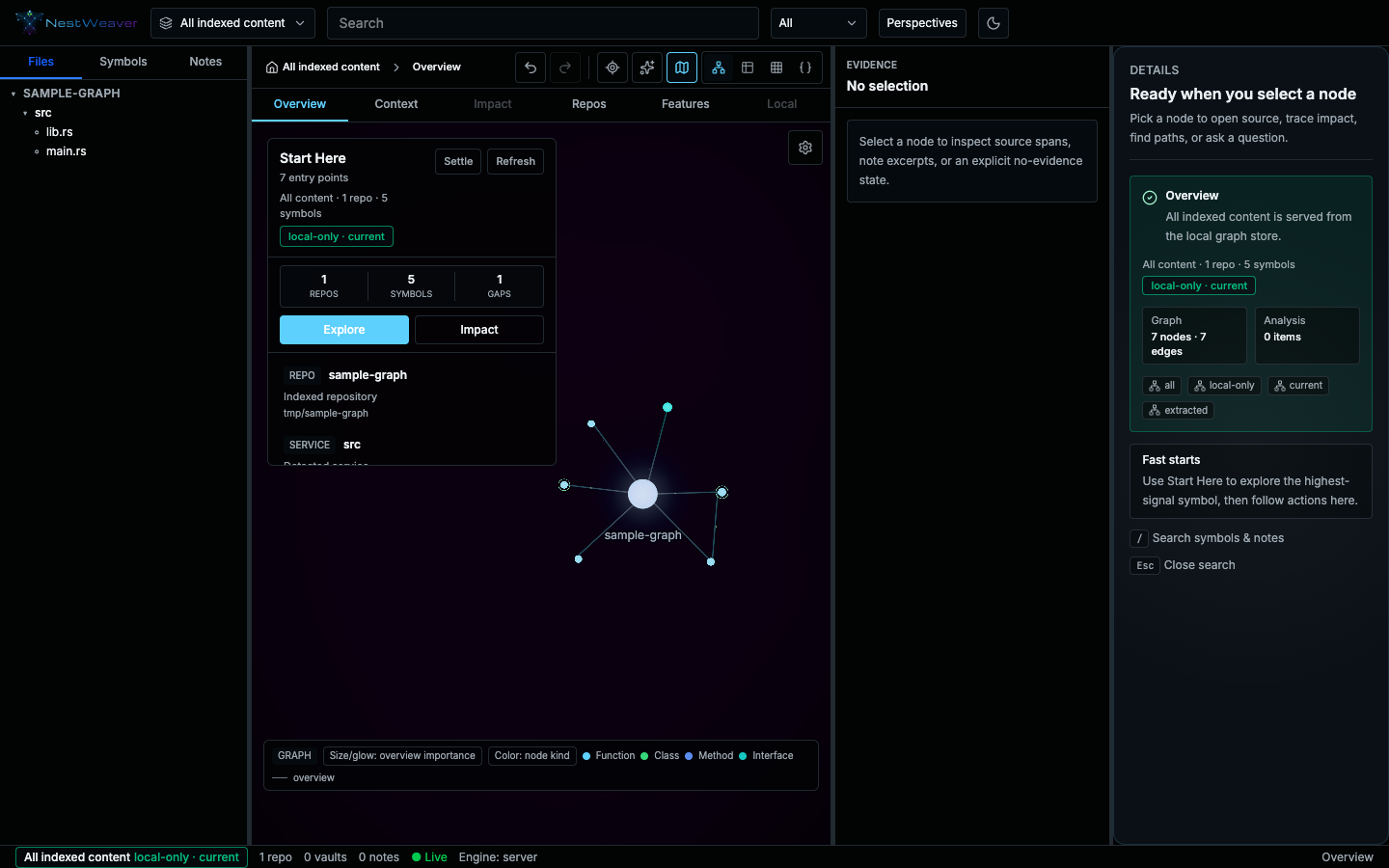
- Left Files, symbols, and notes in the current scope.
- Center Task mode and the graph. Overview is selected here.
- Right Details for the selection. Empty until you pick a node.
- Green chip Local or federated, and whether the index is current.
Start Here, in the center, summarizes what is indexed. Read the green chip before you trust the picture.
A selected symbol
Section titled “A selected symbol”Choose a function in the symbol list. The center switches to Context, the evidence panel shows the source span, and the card on the right lists callers and callees.
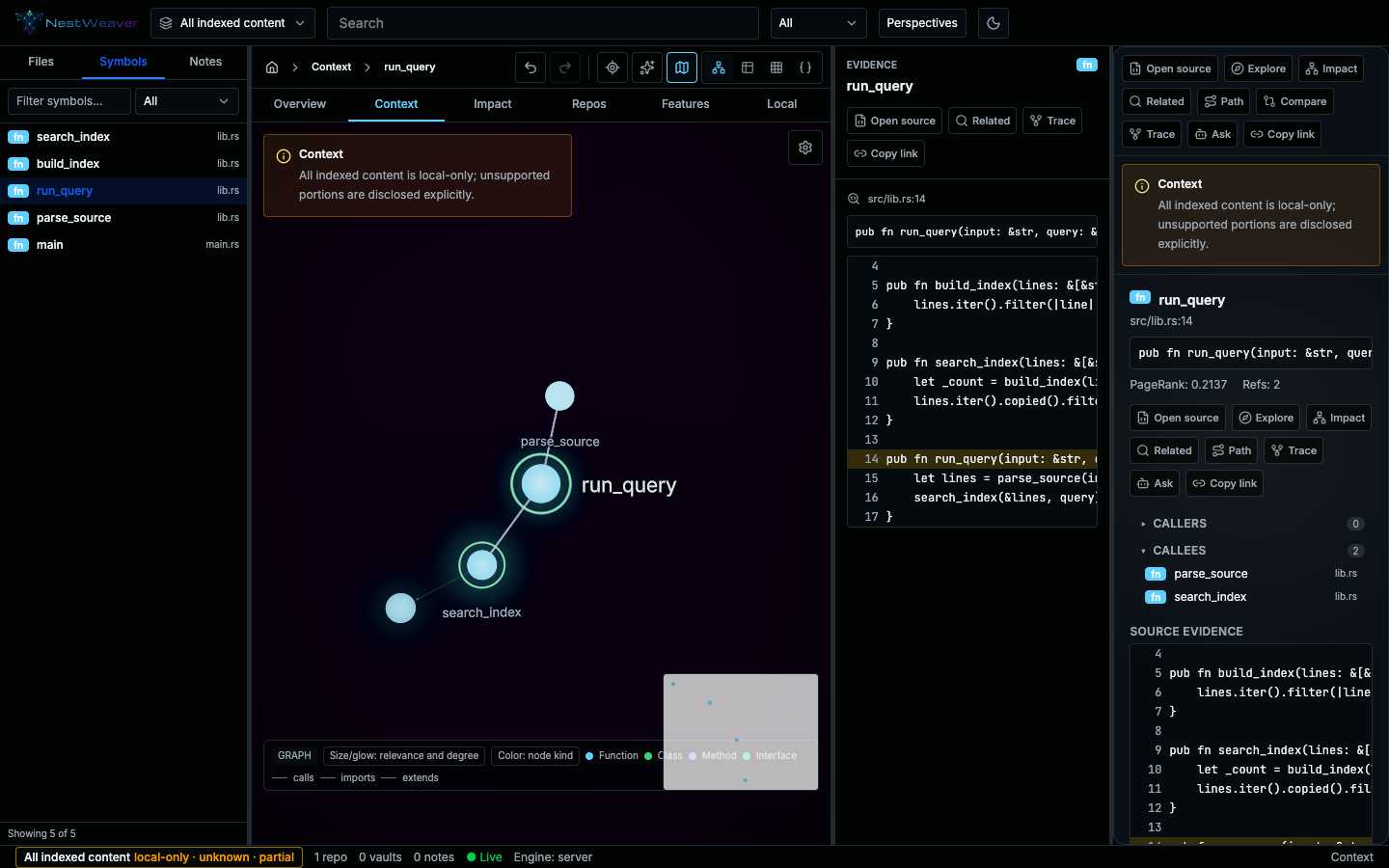
The toolbar above the graph switches representation: graph, table, matrix, or JSON. These screenshots show the graph. Table and JSON are the same nodes in a form you can scan or copy. Press ⌘L to cycle graph, table, and matrix.
- Graph The neighborhood, drawn.
- Table The same nodes as a sortable list.
- Matrix Which of those nodes connect.
- JSON The payload you can copy.
Impact, Repos, Features, and Local use the same three columns. They are not pictured here.
Work by task, not by graph theory
Section titled “Work by task, not by graph theory”Everything in the UI is organized around what you’re trying to do:
- Workspace scope — switch between all indexed content, a single repo, or a vault. Every view carries an honest trust chip: local-only vs federated, current vs stale, partial vs truncated. You always know what the answer is (and isn’t) based on.
- Command bar (
⌘K) and Search Phrases — plain-language queries resolve to typed scenes deterministically. No LLM in the loop; the same phrase always produces the same scene:impact of <symbol>— blast radiustrace flow from <symbol>— forward call chaincallers of <symbol>/callees of <symbol>path from <A> to <B>— shortest path between two symbolstests affected by <symbol>— test selectionnotes about <topic>/backlinks for <note>hubs in <repo>/bridges in <repo>/dead code in <repo>explain <symbol>,contract drift,stale repos
- Task modes — six top-level modes, switchable with the keys
1–6: Overview, Context, Impact, Repos, Features, and Local neighborhood. Impact mode renders a layered blast-radius DAG with affected tests and local/org trust states. Search Phrases and node actions activate additional lenses on top (Trace, Path, and more).
The tri-panel workspace
Section titled “The tri-panel workspace”Activating a node opens three synced panels:
- Graph — a focused subgraph around the selection.
- Evidence — the source span or note excerpt backing the node, with syntax highlighting. When there is no evidence, the UI says so explicitly rather than guessing.
- Knowledge card — identity, role, evidence, relationships, trust, and next actions (open source, trace, find path, impact, ask).
The three panels cross-highlight, so selecting in one focuses the others.
Graph, table, matrix, or JSON
Section titled “Graph, table, matrix, or JSON”Every result set is inspectable multiple ways. ⌘L cycles the three canvas representations — graph, table, and matrix — and a JSON view is a separate toggle:
- Graph — the spatial constellation view.
- Table — an accessible, sortable list of the same nodes.
- Matrix — an adjacency matrix of the scene’s relationships.
- JSON — the raw payload, including the
_metaprovenance and trust envelope.
This means every graph answer has a non-visual equivalent, which matters for accessibility and for copying results into other tools.
Reading the constellation
Section titled “Reading the constellation”The visuals encode meaning, not decoration:
- Color = node kind (function, class, method, interface, note, …).
- Size / glow = importance (PageRank in the current scene).
- Spark-green convergence rings mark betweenness bridges — the architectural chokepoints that connect otherwise separate parts of the graph.
Motion is used sparingly to aid comprehension — a repo-galaxy ignition on load and a focus impact-ripple that traces blast radius — and all motion, bloom, and glow are gated behind prefers-reduced-motion, which the UI auto-detects. There is also a manual reduced-effects toggle.
Keyboard shortcuts
Section titled “Keyboard shortcuts”Press ? in the UI for the full list. The essentials:
| Key | Action |
|---|---|
1–6 | Switch task mode (Overview, Context, Impact, Repos, Features, Local) |
⌘K | Open the ask / Search-Phrase command bar |
/ | Focus search |
⌘L | Cycle graph / table / matrix representation |
⌘⇧G | Toggle zen (canvas-only) layout |
I | Impact of the selected node |
P | Path from the selected node |
M / C / T | Toggle minimap / communities / tags |
⌘Z / ⌘⇧Z | Navigate history back / forward |
Esc | Clear selection |
Deep links
Section titled “Deep links”The URL captures the workspace scope, selected node, active lens, and representation mode, so any view is shareable and restores exactly.
WASM mode
Section titled “WASM mode”Append ?engine=wasm to the URL to load a WebAssembly copy of the graph snapshot. The browser downloads a MessagePack snapshot once per graph generation, and the status bar shows the active engine with the snapshot’s node and edge counts. Queries, including Personalized PageRank, still run on the server. See the build note in the main repository for producing the WASM artifact.